Skip to content
needtricks_logo

Need Tricks

Technology Tips and Tricks

  • Home
  • Internet
    • Ad Networks
      • Internet Browser
        • Firefox
        • Opera
        • Safari
      • Internet Explorer
    • Content
      • Chrome
    • Analytics
  • Computer
    • Desktop
    • Laptop
  • General
    • Household
  • Social Networks
    • Facebook
    • Google Plus
    • Twitter
    • Youtube
  • Operating System
    • Apple
    • Android
    • Windows
    • Bada
    • Blackberry
  • Technology
  • Home
  • Social Networks
  • Learn How to Post Instagram Stories Without Opening Instagram App

Learn How to Post Instagram Stories Without Opening Instagram App

Need Tricks

Step by Step Guide to Post Instagram Stories Without Opening Instagram App
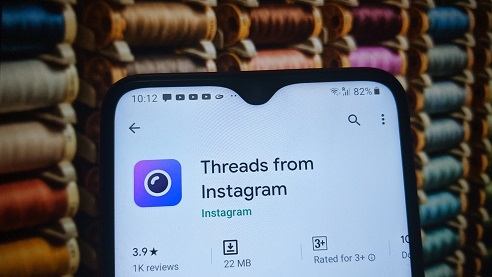
instagram threads

Did you know that Instagram users can select an image or video from their gallery and post them in stories without opening the app. Well, this trick will help you to learn how to post Instagram stories without opening Instragram App

As we know Instagram Stories are among the most popular ways to post photos, videos and other contact on the social media platform. And if looking to directly share or post to your stories the video or photo you have just clicked without completing the formalities like opening the app. Here is the solution for you. For this you will need an app called THREAD by Instagram. Then follow the following guide.

About Instagram:

Instagram (commonly abbreviated to IG or Insta) is an American photo and video sharing social networking service owned by Facebook, created by Kevin Systrom and Mike Krieger and originally launched on iOS in October 2010. The Android version was released in April 2012, followed by a feature-limited desktop interface in November 2012, a Fire OS app in June 2014, and an app for Windows 10 in October 2016. The app allows users to upload media that can be edited with filters and organized by hashtags and geographical tagging.

About Thread:

Thread is launched by Facebook from Instagram, and it is a new camera-first messaging app that helps you stay connected to your close friends. Threads is a standalone app designed with privacy, speed, and your close connections in mind. You can share photos, videos, messages, Stories, and more with your Instagram close friends list. You are in control of who can reach you on Threads, and you can customize the experience around the people who matter most.

Steps by step procedure to Post Instagram Stories Without Opening Instagram App

Step 1:
The first step is to download and install Threads by Instagram app. You can get it easily from the playstore.

Step 2:
After installing it you will need to login using Instagram account and setup your profile by allowing the permissions to the app and the account.

Step 3:
The next is to add people in the list or your favorite list with whom you want to chat or share stories, with this installation work is done.

Step 4:
Next step involves are for sharing the stories, on the home-screen of the app, choose the second tap then click a picture, edit it, you can also add caption of your choice and then tap on the upward arrow when you are finally done with the beatification of the picture.

Step 5:
From the contact list, choose your story Option. You can also select specific contacts if you want to share with specific people.

Share this:

  • Email a link to a friend (Opens in new window) Email
  • Share on Facebook (Opens in new window) Facebook
  • Share on Tumblr (Opens in new window) Tumblr
  • Print (Opens in new window) Print
  • Share on LinkedIn (Opens in new window) LinkedIn
  • Share on Reddit (Opens in new window) Reddit
  • Share on X (Opens in new window) X
  • Share on WhatsApp (Opens in new window) WhatsApp
  • Share on Pinterest (Opens in new window) Pinterest

Like this:

Like Loading…

Related

InstagramSocial Networks
Tagged instagram captions, instagram stories, instagram stories download, instagram stories format, instagram stories without account, instagram story viewer, instagram threads app

Post navigation

⟵ Top 8 Free & Paid Plagiarism Checkers
Step By Step Guide to Do an Advanced Search on Google ⟶

Related Posts

New Year in Review Feature
Instagram New Year in Review Feature How to Create Your Personalized Story

Instagram New Year in Review Feature: How to Create Your Personalized Story. Instagram has unveiled its much-awaited Year in Review…

Share this:

  • Email a link to a friend (Opens in new window) Email
  • Share on Facebook (Opens in new window) Facebook
  • Share on Tumblr (Opens in new window) Tumblr
  • Print (Opens in new window) Print
  • Share on LinkedIn (Opens in new window) LinkedIn
  • Share on Reddit (Opens in new window) Reddit
  • Share on X (Opens in new window) X
  • Share on WhatsApp (Opens in new window) WhatsApp
  • Share on Pinterest (Opens in new window) Pinterest

Like this:

Like Loading…
Adding Music to Your Instagram Carousels
Enhancing Your Instagram Carousel Posts: Adding Music to Your Instagram Carousels

Adding music to your Instagram carousels is a creative and effective way to enhance your content and engage with your…

Share this:

  • Email a link to a friend (Opens in new window) Email
  • Share on Facebook (Opens in new window) Facebook
  • Share on Tumblr (Opens in new window) Tumblr
  • Print (Opens in new window) Print
  • Share on LinkedIn (Opens in new window) LinkedIn
  • Share on Reddit (Opens in new window) Reddit
  • Share on X (Opens in new window) X
  • Share on WhatsApp (Opens in new window) WhatsApp
  • Share on Pinterest (Opens in new window) Pinterest

Like this:

Like Loading…
Save and Share Audio from Instagram Reels
Instagram Tips: Save and Share Audio from Instagram Reels

How to save and share audio from Instagram Reels In this trick we will teach you how to save and…

Share this:

  • Email a link to a friend (Opens in new window) Email
  • Share on Facebook (Opens in new window) Facebook
  • Share on Tumblr (Opens in new window) Tumblr
  • Print (Opens in new window) Print
  • Share on LinkedIn (Opens in new window) LinkedIn
  • Share on Reddit (Opens in new window) Reddit
  • Share on X (Opens in new window) X
  • Share on WhatsApp (Opens in new window) WhatsApp
  • Share on Pinterest (Opens in new window) Pinterest

Like this:

Like Loading…

Some Additional Links

  • Home
  • Editorial team information
  • Corrections Policy
  • Ethics Policy
  • Fact checking Policy
  • About us
  • Submit your trick
  • Contact us
  • Terms and Conditions
  • Visitor Post
  • Privacy Policy

Popular Posts

  • online survey form modish digital information collection internet network 31965 233258
    How Much of Your Daily Life Depends on the Internet?
  • charming lucky goodlooking energized young blond caucasian girl blurred stretch hand show camera smartphone display promoting phone application gadget standing white background 176420 55485
    Why New Phones No Longer Feel as Exciting as They Used To
  • protection personal information cookie mascot character with internet web pop up we use cookies policy notification 48369 43246
    Why Do Websites Ask You to Accept Cookies?
  • photo realistic as marketing specialist enjoying relaxing bath concept as marketing specialist e 980716 380138
    Technologies That Quietly Changed Daily Life Without People Noticing
  • negative online review customer feedback smartphone 1169301 3973
    Why We Remember Negative Comments More Than Positive Ones Online
  • computer network storage center hub graphic 53876 124460
    Why Your Computer Storage Fills Up Even When You Don’t Download Anything
  • man asks question artificial intelligence bot chatbot form cute robot 681307 158
    Why AI Sometimes Gives Different Answers to the Same Question
  • troubleshooting wi fi connection problems 901003 185104
    What Happens When a Website Goes Offline?
  • stylized low battery logo vector illustration vector illustration 1149116 22486
    Why Do Some Apps Drain Battery Faster Than Others?
Follow Us
  • Facebook
  • Twitter
  • Instagram
  • YouTube
  • LinkedIn
  • Pinterest
  • Quora
Quick Links
  • Home
  • Editorial team information
  • Corrections Policy
  • Ethics Policy
  • Fact checking Policy
  • About us
  • Submit your trick
  • Contact us
  • Terms and Conditions
  • Visitor Post
  • Privacy Policy
Copyright © 2026 Need Tricks | Extensive News by Ascendoor | Powered by WordPress.

Loading Comments...

    %d